Your machine works.
Only the connection is missing.
Secure network connectivity for older CNC machines with SMB1, NFSv2 or FTP. The machine stays as it is.
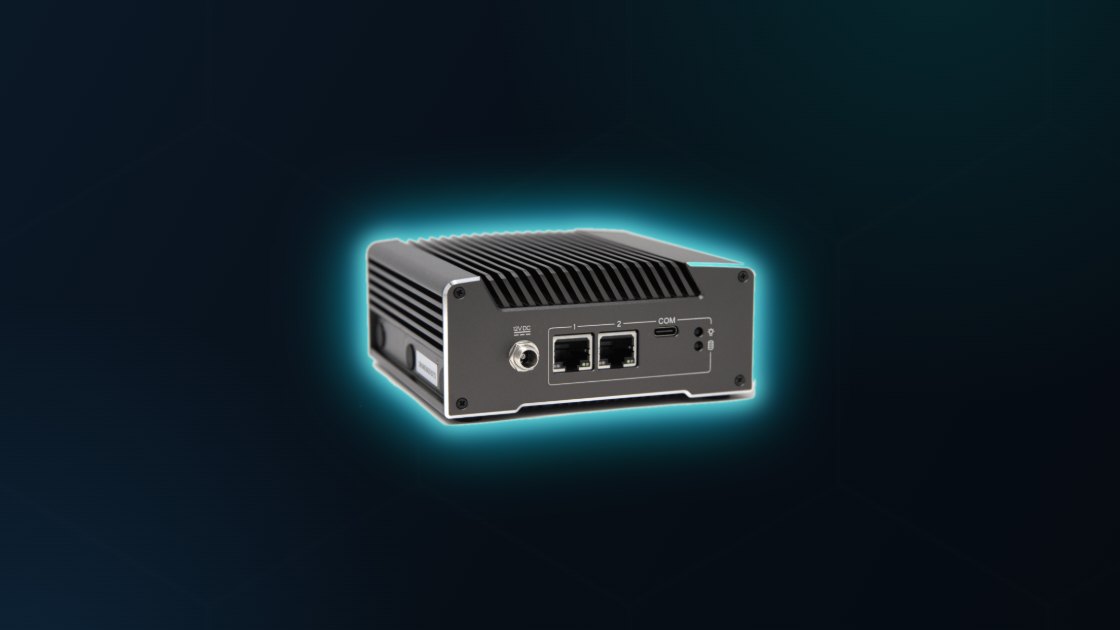

 ONLINE · SMB3 ACTIVE
One device. Between machine and network.
Industrial hardware in an aluminium housing, mounted right at the machine. Two network ports separate the worlds: one to the control, one to the company network.
Why replacing your CNC machine is the wrong answer
Your machine constantly exchanges programs and jobs with the company network; older controls do so via protocols now considered insecure. The problem is never the machine, only this connection. That is exactly what L1NE takes over, without changing anything about the operation.
“L1NE sits between machine and corporate network like a digital bodyguard.”
Continuity instead of changeover
One device, one point of contact
Logiphys supplies and installs L1NE: no separate IT project, just one short planned stop. Ongoing support and updates can be added optionally.
Talk to us ↓SMB1 and NFSv2 securely isolated
Standard industrial hardware instead of a black box, audit-friendly, no proprietary firmware dependency. Each device sits decentralised right at its machine, no central single point of failure, no cloud dependency in daily operation.
CNC machine
Company network
Everything centrally in the browser
No proprietary Windows tool required, WebConfig runs on Mac, Linux, Windows and mobile.
Protocol gateway
SMB1/2/3, NFS v2–v4 and FTP, configurable separately for the legacy and modern side.
WebConfig
Browser-based, platform-independent, not a Windows-only tool.
Data Sync
Bidirectional sync between host and legacy VM, configurable interval.
SMB-Bridges
External shares (NAS, Windows servers) mirrored automatically with zone separation.
Trash Browser
30-day retention of overwritten or deleted files.
USB-Bridging
Network down? Plug in a USB stick, the machine keeps working directly with the data on it.
Vendor-independent
Works with controls from any manufacturer that has a network interface, no vendor lock-in.


True isolation. Decentralised and fail-safe.
KVM virtualisation
Host (SMB3/NFSv4) and legacy VM (SMB1/2, NFSv2/v3, FTP) are separated by real process, kernel, file-system and network isolation.
Default-deny firewall
No routing between the machine network and the intranet, every cross-zone access runs exclusively through defined, controlled paths.
Signed firmware & OS bundles
No phone-home to vendor servers; firmware and OS updates exclusively via signed, verified bundles.
Decentralised = resilient
Every L1NE is an autonomous appliance right at its machine. If one device fails it affects only that machine, never the whole production line.
Four steps. Not a project.
Enquiry & alignment
A brief conversation: which machines are affected, what does your network look like? Logiphys handles the rest.
Installation
L1NE is placed between machine and network, one small adjustment, minimal downtime.
Operation
Runs in the background, operators notice nothing. Support and updates can be added optionally.
Updates
Signed firmware and OS bundles via WebConfig or USB stick. Snapshot before every update, automatic rollback on errors, usually without a reboot.
From a single gateway to a centrally managed platform
L1NE Appliance is the entry point, security and legacy connectivity are built in from the start, not optional. A clear growth path builds on it, bookable individually or combined. Update and support plans with defined SLAs complete the offer.
L1NE Cloud / L1NE Hub
Central configuration, log & backup management, licence management and automated update distribution for the entire fleet, as SaaS or on-prem.
Modern Connect
Modern machine protocols (cloud or local MQTT, OPC UA) plus SharePoint/OneDrive connectivity, as an extension of Cloud or Hub.
Security plan
Requires an internet connection: SOC/EDR connectivity straight from the device, available independently of Cloud/Hub, full visibility combined with fleet management.
In development, planned for Q4 2026 / Q1 2027. Prices on request.
The L1NE brochure to take away
All information in one compact PDF, in six languages.
Switching off SMB1 without stopping production
Four options compared, IEC 62443 architecture, five steps, audit checklist, PDF, in German.
Request free copy →Frequently asked questions about CNC networking
How does the protocol switch work with L1NE?+
The L1NE gateway converts insecure connections such as SMB1 or NFSv2 into encrypted, modern standards (SMB3, NFSv4). The upgrade is transparent and requires no changes to the machine control.
Which machines and controls are supported?+
L1NE works with controls from all manufacturers that have a network interface, no vendor lock-in on the machine side. Typical examples: Siemens Sinumerik, Heidenhain, Fanuc, Mazak, Haas, Okuma and older Windows-based controls.
Is installation complex?+
No. L1NE is placed between machine and network; only the IP and share are adjusted on the machine, no retrofit, no conversion. The machine stops only briefly.
Can L1NE be integrated into existing IT security concepts?+
Yes. The gateway is Linux-based, EDR-capable and offers monitoring interfaces, seamless integration into your existing security concept.
What happens if the network goes down?+
The machine keeps working: with USB bridging you plug a USB stick into L1NE: the machine accesses the data on the stick directly. Once the network is back, synchronisation resumes.
What happens if an L1NE device fails?+
Only that one machine is affected, never the whole line. Every L1NE is an autonomous appliance; a replacement is set up quickly, and the machine bridges the gap via USB if needed.
What does L1NE cost?+
L1NE is purchased once as an appliance, security and legacy connectivity are included. Update, support and security plans are optional. We are happy to quote prices on request.
Does L1NE help with NIS2, ISO 27001 and OT security requirements?+
Yes. L1NE separates the machine network from the company network (zone concept per IEC 62443), keeps SMB1 and NFSv2 out of the intranet and provides signed updates plus EDR and monitoring integration, key building blocks for NIS2, ISO 27001 and TISAX.
Questions? Let’s talk.
Enquire without obligation, after a short conversation you will know whether L1NE fits your machines.
You can find more information about L1NE and CNC networking on the Logiphys website. logiphys.de →With your consent we use Google services to measure whether our ads work. Voluntary and revocable at any time in the footer. Privacy · Legal notice
Stores your language and this choice in your browser. Nothing is sent to us or third parties.
Google Tag Manager, Google Ads, Google AdSense and Google DoubleClick by Google Ireland Limited. Measures whether our ads work and shows ads for L1NE on other websites. Details
USA: Google may also process data in the USA (EU-U.S. Data Privacy Framework). Access by US authorities cannot be ruled out.